A tour of the 1st.game lobby
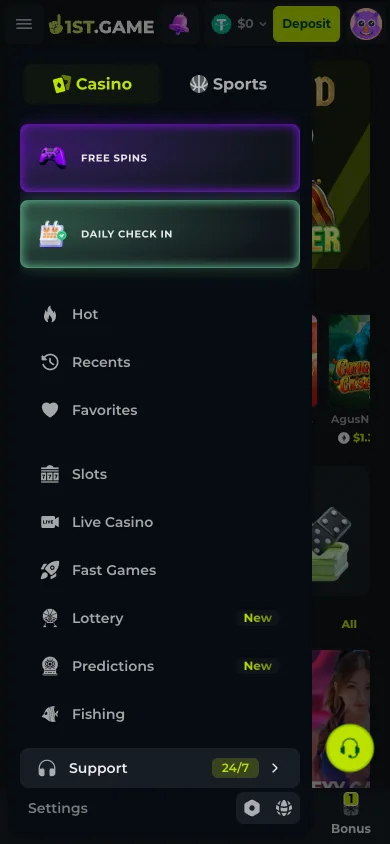
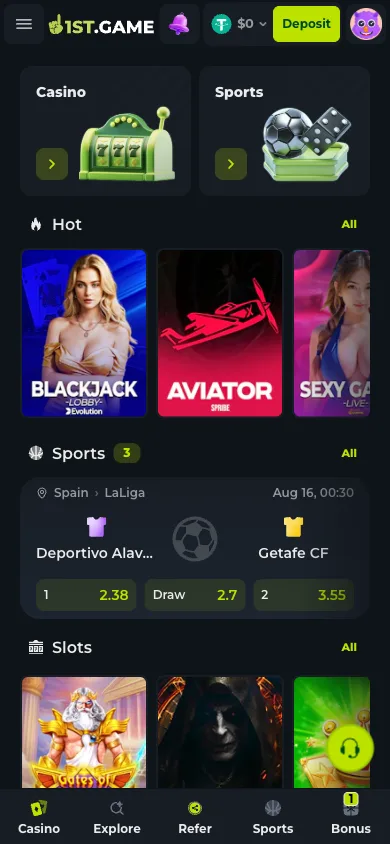
A catalog this wide lives or dies by its navigation, so before recommending anything we walked the shelves. The layout resolves into three instruments. The side drawer is the master index: a Casino/Sports split at the top, then Hot, Recents, Favorites, Slots, Live Casino, Fast Games, Fishing, two categories flagged New on the day — Lottery and Predictions — and a Providers entry that re-sorts everything by studio. The bottom dock is the five-stop commute: Casino, Explore, Refer, Sports, Bonus, pinned on every screen. And the lobby itself is the shop window — a scroll of curated rows where a sports strip with live odds sits between slot shelves, and a Recent Big Wins ticker rolls other players' results in real time. The detail that impressed us most sits one tap deeper: every game page we opened published its RTP, its maximum win multiplier, its mechanics in a Game Information block, and — the part worth building a habit around — a Demo Play button that runs the real game without touching your balance. On a platform where switching from a live table to a slot costs one tap, knowing how to read a game page before staking is the tour's real payoff.
The three instruments, and when to use which
Drawer, dock, lobby scroll — three routes to the same catalog, tuned for different moments. Learning which one answers which question saves the twenty-taps-of-scrolling that makes big catalogs feel bigger than they are.
The drawer: when you know what you want
Category list plus a Casino/Sports toggle at the top. Recents refills itself; Favorites you curate from the heart icon on game pages. Providers re-sorts the catalog by studio — the fastest route when you trust a specific developer's work and want their shelf, not the platform's picks.
The dock: the five-tap commute
Casino, Explore, Refer, Sports, Bonus — pinned to the bottom of every screen. It is the reason nothing on the platform is ever more than two taps away, and the reason a slot session drifts into a sports line so easily. Useful and worth being conscious of, for the same reason.
The lobby scroll: when you are browsing
Curated rows — Hot titles, slot shelves, a live-odds sports strip mid-page — with a Recent Big Wins ticker rolling through. Treat the ticker as atmosphere, not information: it samples wins across thousands of players and says nothing about any game's odds for you.
The game page: where the facts live
The title we opened — a Pragmatic Play slot — printed RTP 96.60%, a 50,000x max win, its tag list, a mechanics explainer, and Play beside Demo Play. A currency selector chooses which held balance you stake. The two minutes spent reading this page beat any review written by someone else, including us.
1. Open the drawer and read the full category list
Hamburger, top left. Note the Casino/Sports toggle at the top — it changes what the categories below show. On 2026-08-03 the entries went Hot, then Recents and Favorites, then Slots, Live Casino, Fast Games, Lottery, Predictions, Fishing, Providers — Lottery and Predictions wearing New badges. Thirty seconds here beats ten minutes of lobby scrolling for learning what the platform actually stocks.
2. Walk the lobby scroll once, ticker and all
The lobby interleaves its shelves deliberately: promotional tiles up top, Hot titles, a sports strip with live odds mid-scroll — real fixtures with real prices on the day — then more slot rows, with Recent Big Wins rolling throughout. One full pass tells you the platform's merchandising logic. The ticker is engineered optimism; enjoy it as set dressing and let your game choices come from the drawer and the game pages instead.
3. Open any game page and read before you stake
Tap a title and resist the Play button for two minutes. The page publishes the studio, RTP, maximum win, tags and a mechanics block — our example showed 96.60% RTP and a 50,000x ceiling with a grid-and-tumble explainer. RTP is long-run arithmetic, not a session forecast, but comparing it across candidates is still the most informed choice available to you. The currency selector beside Play decides which of your held balances stakes.

4. Make Demo Play the default first tap
Every slot page we opened carried Demo Play beside the real-money button — the full game, no balance involved. Use it to feel a title's volatility: how long the quiet stretches run, how the feature rounds trigger, whether the pace suits a ten-minute break or a longer sit. A demo session that bores you just saved you the same session at stake. Mark keepers with the heart icon so Favorites becomes your own shelf.
5. Let Recents and Favorites replace your memory
Both live near the top of the drawer. Recents fills itself as you play; Favorites holds only what you heart deliberately. Between them, refinding last week's game never requires remembering which of ten categories filed it — which, on a catalog that re-sorts its shelves and rotates what is Hot, is the difference between your list and the platform's list.
Frequently asked questions
Where are the live dealer tables in all this?
Live Casino is its own drawer category, and live-table rows surface in the lobby scroll. The Casino/Sports toggle at the top of the drawer needs to be on Casino for the table categories to show — with Sports selected, the same drawer serves the sportsbook's navigation instead.
Is Demo Play available on everything?
We saw it on the slot pages we opened; live dealer tables by their nature run real rounds with real dealers, so expect demo mode on RNG titles rather than the live floor. Where it exists it is the full game with no balance at risk, which makes it the cheapest research tool on the site.
What does the Providers category actually do?
It re-sorts the catalog by studio rather than by game type. If you know you like a specific developer's mathematics and pacing, their shelf under Providers is faster than hunting their titles across Slots, Fast Games and the lobby rows. The game page confirms the studio on every title.
Do the New badges on Lottery and Predictions mean anything?
They flag recently added categories — on 2026-08-03 those two carried the badge. New here means new to the platform's catalog, not audited-better or higher-paying. The same game-page reading habit applies: check the rules and published figures before staking, exactly as with the older shelves.
