Creating an account at 1st.game
The whole catalog — live tables, the slot wall, the card room, the sportsbook — sits behind a single account, so opening one is the only piece of paperwork between you and any of it. We opened that paperwork on 2026-08-03 and it turned out to be thinner than the average newsletter subscription: one field that takes an email address or a phone number, one password field, and a puzzle to prove a human is present. No text-message code arrived, no confirmation email gated the account, and nothing asked for a name or a date of birth at this stage. The account came into existence the moment the puzzle cleared, already signed in, with a task panel offering small starter rewards layered over the lobby. Two quirks are worth flagging up front. The site guesses your language from your connection rather than your browser, so the first load may arrive in a script you do not read — the switch sits down in the side drawer beside Settings, nowhere near the header. And you never pick a username: the platform assigns a numeric ID and a random handle, which you should copy down before the session ends, because they are what support and the transaction ledger call you.
Before you tap Sign Up
Three decisions are worth making before the form opens rather than while it is open. They are small, but each one saves a support conversation later — and none of them can be delegated to the platform, because they are about what you hand it.
Pick the contact you will still own
The email or phone number you enter is the login handle and the recovery route in one. A work address or a throwaway inbox fails at exactly the wrong moment — months later, when a password reset is the only way back in.
Read the two boxes that come pre-ticked
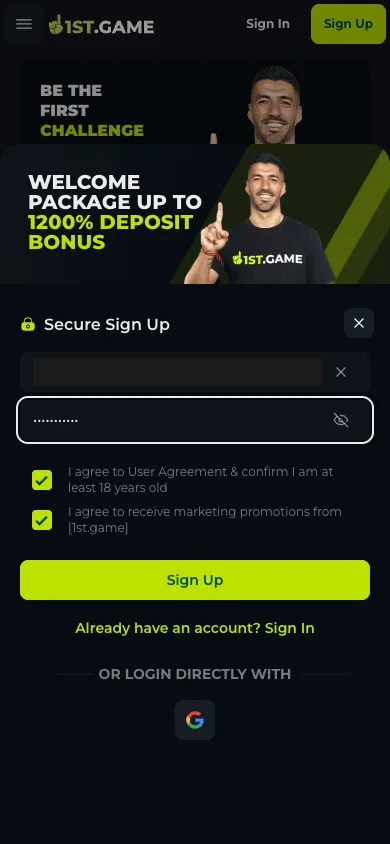
The first states that you are of age and agree to the user terms; the second opts you into marketing messages. Both arrive already ticked. The age box is required; the marketing one is not, and unticking it costs nothing.
Expect the wrong language first
The interface follows where your connection appears to come from, not your browser settings. If the page loads in Chinese or Portuguese, the switch is in the side drawer: bottom Settings row, globe icon, then English or any of the dozen listed languages. It applies instantly.
Google sign-in exists as a shortcut
Under the form sits a Google button for direct login. This walkthrough used the email path and photographed only that, so the Google route is noted here as present on the screen rather than described step by step.
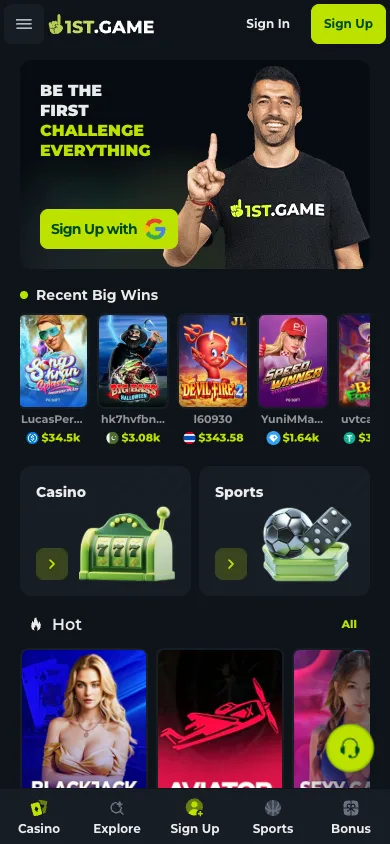
1. Get the interface into your language
On first load, check the header and bottom bar before anything else. If the text is not in a language you read, open the drawer from the top-left hamburger, run past the game categories until the Settings row appears at the foot of the drawer, and tap the globe next to it. English, Español, Português, Tiếng Việt, Japanese, Korean and both Chinese scripts are on the list. Doing this first means every screen after this one reads the way this guide describes it.
2. Open the form and fill the only two fields there are
The Sign Up button raises a panel titled Secure Sign Up. Field one takes an email address or a phone number — either works as the permanent login handle. Field two is the password, with an eye toggle to check what you typed. Underneath sit the two pre-ticked checkboxes described above; deal with the marketing one now, because you will not remember it exists later. There is no username field, no referral field to hunt for, no date-of-birth picker.
3. Clear the puzzle — the one step that needs a human
Sign Up does not submit the form directly; it summons a challenge widget first. On our run it asked, in two different attempts, for a shape to be dragged into a silhouette and for the one shape that was growing to be tapped. The skip control only exchanges one puzzle for another, so there is no route around it — just through. Nothing needs preparing beyond a stable connection and about ten seconds of attention.
4. Land in the account — no inbox detour
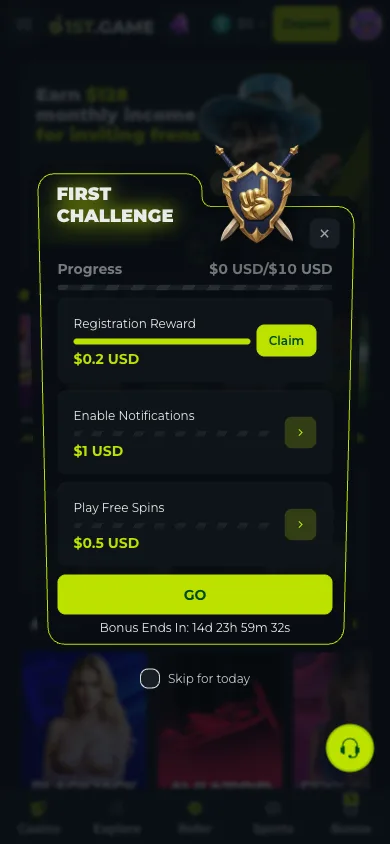
The instant the puzzle clears you are signed in. The header swaps to a balance chip showing $0 next to a Deposit button, and a First Challenge panel slides over the lobby with three starter tasks against a ten-dollar progress bar: claim a small registration reward, enable notifications, play a round of free spins. Each pays a fraction of a dollar inside a roughly two-week window. Treat the money as incidental — the tasks are really a guided tour of corners of the interface you would otherwise find by accident.
5. Copy your assigned ID before you wander off
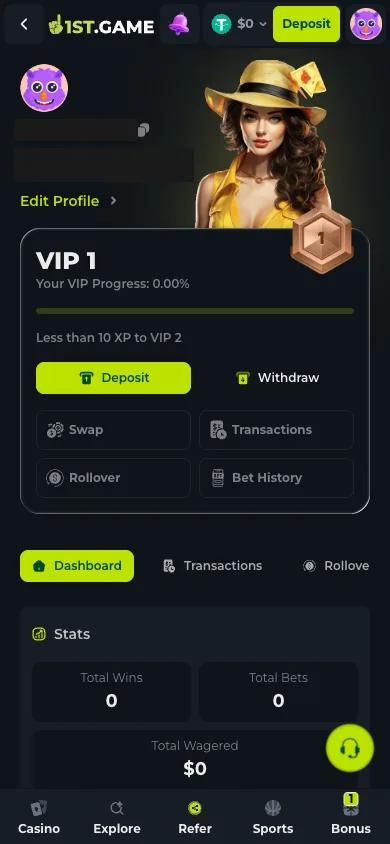
Tap the avatar in the top corner and the profile screen shows what the platform decided to call you: a ten-digit account ID with a copy icon, and a randomly generated handle underneath. Store both somewhere durable — a password manager note is ideal — because deposits, payout queries and support conversations reference the ID, not your email address. The same screen holds the VIP progress bar and shortcuts into deposit, withdrawal and history.
Frequently asked questions
Is there an SMS or email verification step?
Not at sign-up, on the screens we opened on 2026-08-03. The account worked immediately with no code entry. Verify Email and Verify Phone exist as optional reward tasks in the bonus area instead — worth doing early, since identity checks on money platforms tend to resurface at the first payout.
Can I choose my own username?
No. The platform assigns a numeric account ID and a random handle at creation, both shown on the profile screen. You log in with your email or phone number rather than the handle, so the assignment matters less than it first appears — but copy the ID down, because records are keyed to it.
Does one account cover the live tables and the sportsbook too?
Yes — one balance, one login, every category. That is the point of the single-account design: a baccarat session, a slot spin and a football bet all draw on the same total, with no internal transfer step between them.
What if the puzzle keeps failing?
The refresh arrow reloads the same puzzle and the skip button swaps in a different one — neither bypasses the check. On an unstable connection the widget can stall; letting the page reload and pressing Sign Up again brings a fresh one. It was cleared on the second attempt during our run.
